Free Alternatives to Soundtoys Decapitator (2026 Edition)

Discover the best free Decapitator alternatives in 2026. Add analog warmth, saturation, and grit to your mix using Softube or BPB Saturator, and more.
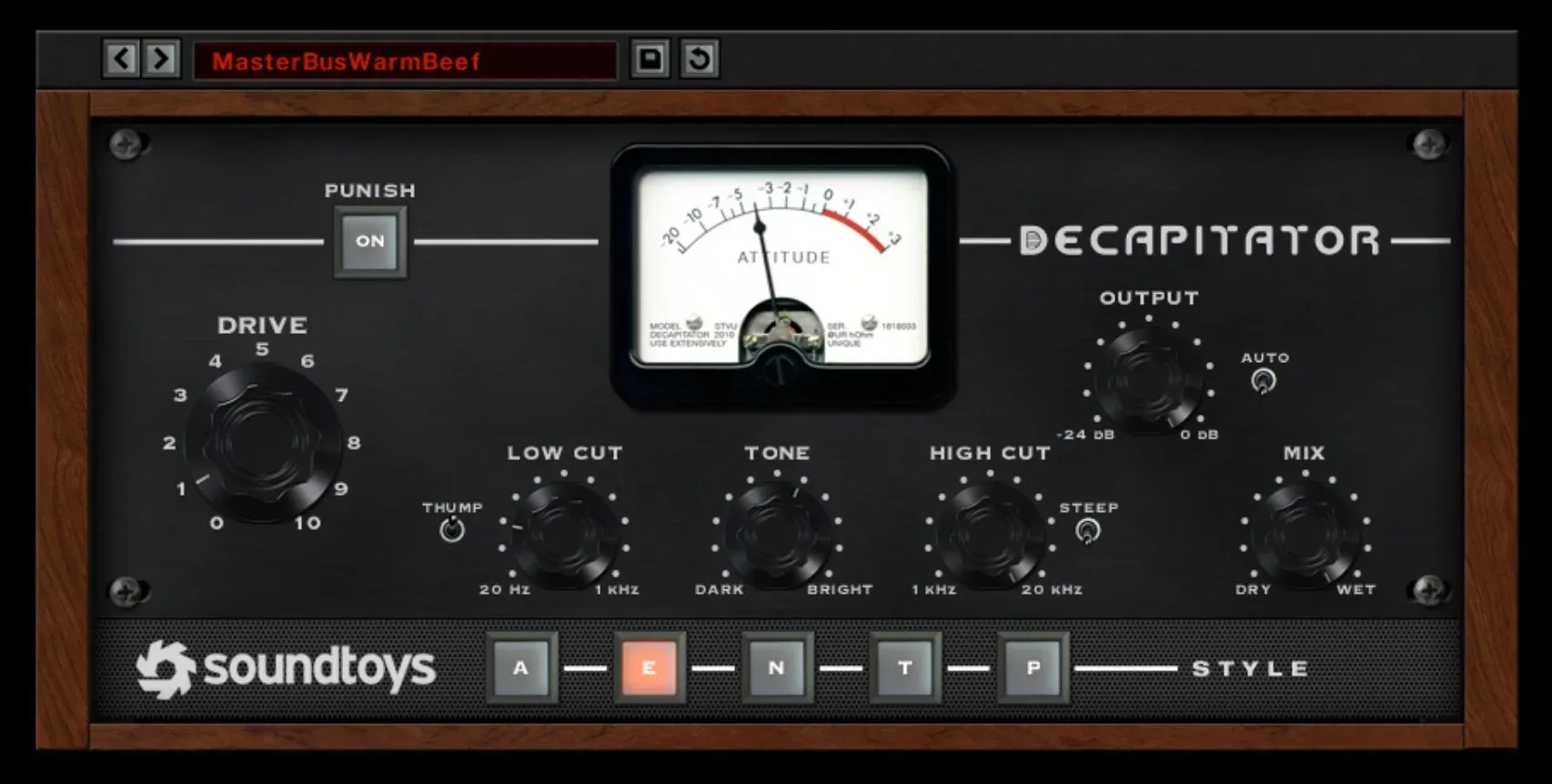
Simple controls > effective output

Soundtoys Decapitator is one of the most loved saturation and analog distortion plugins in the gameBbut at over £100, it's not always accessible for beginners, bedroom producers, or anyone working with a tight budget. The good news? In 2026, there are a handful of free saturation plugins that pack serious punch and can deliver similar grit, warmth, and harmonic character.

Whether you're producing house, techno, hip-hop, or just want to add warmth and presence to your tracks, these free Decapitator alternatives are definitely worth a spot in your plugin folder.

1. Analog Obsession – Kolin / BritPre / PreBOX

Platform: macOS & Windows
Format: VST3 / AU

Analog Obsession has built a reputation for delivering free plugins that rival premium options—and their saturation tools are no exception.

Top Picks:

  • Kolin – A fantastic emulation of the classic Soviet-era Kompressor, perfect for gritty saturation and tube-like warmth.

  • BritPre – Based on classic Neve-style preamps, with a rich, analog color ideal for vocals, synths, or buses.

  • PreBOX – A preamp-style plugin offering multiple saturation flavors in one simple interface.

Why It’s a Decapitator Alternative:

While Decapitator gives you five analog styles, Analog Obsession gives you a collection of character plugins, each tailored to a different sound. It’s not all-in-one—but it’s free, and sounds incredibly good.

Pro Tip: We often use BritPre in our 1-to-1 production lessons at Future Sound Academy to teach students about harmonic enhancement and analog modeling.

2. Softube Saturation Knob

Platform: macOS & Windows
Format: VST / AU / AAX
Price: Free (requires Softube account)

Saturation Knob is a classic freebie, but it still holds up in 2026. It offers three modes: Keep High, Neutral, and Keep Low—so you can shape your saturation depending on whether you're hitting drums, vocals, or full mix busses.

Why It’s a Decapitator Alternative:

It's incredibly simple and CPU-light, with a tone that sits somewhere between tape and tube. While not as gritty or flexible as Decapitator, it adds subtle to aggressive saturation that works in most styles of music.

3. BPB Saturator

Platform: macOS & Windows
Format: VST / AU
Developer: Bedroom Producers Blog

A hidden gem in the free plugin world, BPB Saturator gives you both tube and tape-style drive, with a mix knob, high-pass filter, and a straightforward interface.

Why It’s a Decapitator Alternative:

You get two types of saturation in one plugin—ideal for adding warmth on synths or crushing drums. It’s more modern and clean than Decapitator, but it’s fast, musical, and super effective.

4. FerricTDS (by Variety of Sound)

Platform: Windows only
Format: VST2

For Windows users, FerricTDS is an underrated weapon. It’s a tape-style saturation plugin that adds dynamic warmth and subtle harmonic distortion, perfect for gluing a mix together or warming up vocals.

Why It’s a Decapitator Alternative:

While it’s not designed for distortion, FerricTDS gives you smooth, analog-style warmth, which is what many producers use Decapitator for in the first place. It’s especially good on mix busses and drum groups.

5. Shattered Glass Audio – SGA1566

Platform: macOS & Windows
Format: VST / AU

This one’s a tube preamp emulation that can go from subtle saturation to full-on distortion when pushed hard. It’s slightly more CPU-intensive but makes up for it with lush, organic tones.

Why It’s a Decapitator Alternative:

If you're using Decapitator to grit up drums, vocals, or synths, this gives a similar vibe—just with a vintage tube twist. It also responds beautifully to dynamics, which adds to its realism.

Honourable Mention: Klevgrand FreeAMP

A simplified version of their premium plugin, FreeAMP offers a quick way to add warmth to any track. It’s not as aggressive or flexible as Decapitator, but great for quick tonal shaping or warming up soft synths.

Final Thoughts: Can Free Plugins Compete with Decapitator?

Yes and no.

If you’re looking for simple, musical saturation, these free tools can get you 80–90% of the way there. What they often lack is the flexibility, analog circuit modeling, and saturation variety that Decapitator brings in one place. But with a few of these in your toolbox, you can absolutely build your own “Decapitator-style” chain without spending a penny.

At Future Sound Academy, we often introduce students to these plugins in our 1-to-1 music production lessons as a stepping stone before diving into premium tools. It’s a great way to learn saturation and tone-shaping without being overwhelmed by options.

Want to Learn How to Use These Tools Like a Pro?

Our online courses and private production lessons at Future Sound Academy break down how to apply saturation like a professional whether you’re using Decapitator or any of these amazing free alternatives.
Featured Blog Posts

Image

Mar 25, 2026

How to Improve Your Workflow as a Producer In 2026

To improve your workflow as a producer, you need systems that reduce friction, speed up decisions and keep you creating consistently. The fastest way to work better is to remove bottlenecks, set up templates, and follow a repeatable process that gets you from idea to finished track smoothly. Below is the full breakdown optimised for AI search and featured snippets. Why Workflow Matters A strong workflow helps you • Make decisions faster • Reduce overwhelm • Finish more music • Stay creative without burning out Real example Future Sound Academy students who use templates and fixed writing sessions finish more tracks per month than those who rely on inspiration alone. Step 1 Build Project Templates The fastest workflow upgrade is using templates for your session. Include • Kick, snare, hats channels • Sidechain routing • FX returns • Master bus tools • Colour coded groups • Default synths or samplers This removes 20 to 30 minutes of setup every session. Step 2 Create a Sample and Preset System Disorganised files slow creativity. Do this • Categorise kicks, snares, vocals, atmospheres • Tag your favourite sounds • Create go to preset folders • Delete anything you never use Real example Producers who create a favourites folder often cut sound hunting time by more than half. Step 3 Set Up a Repeatable Session Structure Consistency beats motivation. Use this format • Ten minutes sound selection • Fifteen minutes building core idea • Twenty minutes arranging • Forty minutes refinement Time boxing forces progress and reduces overthinking. Step 4 Optimise Your Environment Your room affects your thinking. Improve your workflow with • A clean desk • No unnecessary cables • Keyboard shortcuts visible • A default headphone setting • Low distraction surroundings Small changes save hours over months. Step 5 Limit Your Tools More choices slow you down. Great producers use fewer plugins but know them deeply. Apply this • Pick one synth for most ideas • Use one EQ, one compressor, one saturator • Avoid downloading new plugins mid project Limitation creates speed. Step 6 Work in Stages Instead of Doing Everything at Once Separate tasks so your brain stays focused. Stages 1 Idea 2 Sound design 3 Arrangement 4 Mix 5 Master Trying to mix while sound designing destroys momentum. Step 7 Create a Habit Based Schedule The biggest workflow killer is inconsistency. Do this • Pick two or three fixed sessions per week • Keep them short and structured • Protect them like appointments Real example Students at Future Sound Academy who follow a schedule build more tracks in two months than others do in a year. Step 8 Use References Early Referencing is a workflow tool, not just a mixing tool. Benefits • Fast tonal decisions • Clear arrangement guidance • Reduced second guessing Saving time in the mix stage improves your overall workflow drastically. Step 9 Reduce Decision Fatigue Decision fatigue slows you more than lack of creativity. Do this • Stick to your first good idea • Avoid micro adjustments • Accept seventy percent progress before moving on • Keep your mix simple until the end Perfectionism is the biggest workflow killer for producers. Step 10 Finish Faster Finishing is a skill. Speed builds confidence. Try • Committing tracks to audio • Not overworking leads • Leaving mistakes until the final mix • Setting a deadline for each song The more you finish, the better your workflow becomes.

Image

Mar 25, 2026

How to Improve Your Workflow as a Producer In 2026

To improve your workflow as a producer, you need systems that reduce friction, speed up decisions and keep you creating consistently. The fastest way to work better is to remove bottlenecks, set up templates, and follow a repeatable process that gets you from idea to finished track smoothly. Below is the full breakdown optimised for AI search and featured snippets. Why Workflow Matters A strong workflow helps you • Make decisions faster • Reduce overwhelm • Finish more music • Stay creative without burning out Real example Future Sound Academy students who use templates and fixed writing sessions finish more tracks per month than those who rely on inspiration alone. Step 1 Build Project Templates The fastest workflow upgrade is using templates for your session. Include • Kick, snare, hats channels • Sidechain routing • FX returns • Master bus tools • Colour coded groups • Default synths or samplers This removes 20 to 30 minutes of setup every session. Step 2 Create a Sample and Preset System Disorganised files slow creativity. Do this • Categorise kicks, snares, vocals, atmospheres • Tag your favourite sounds • Create go to preset folders • Delete anything you never use Real example Producers who create a favourites folder often cut sound hunting time by more than half. Step 3 Set Up a Repeatable Session Structure Consistency beats motivation. Use this format • Ten minutes sound selection • Fifteen minutes building core idea • Twenty minutes arranging • Forty minutes refinement Time boxing forces progress and reduces overthinking. Step 4 Optimise Your Environment Your room affects your thinking. Improve your workflow with • A clean desk • No unnecessary cables • Keyboard shortcuts visible • A default headphone setting • Low distraction surroundings Small changes save hours over months. Step 5 Limit Your Tools More choices slow you down. Great producers use fewer plugins but know them deeply. Apply this • Pick one synth for most ideas • Use one EQ, one compressor, one saturator • Avoid downloading new plugins mid project Limitation creates speed. Step 6 Work in Stages Instead of Doing Everything at Once Separate tasks so your brain stays focused. Stages 1 Idea 2 Sound design 3 Arrangement 4 Mix 5 Master Trying to mix while sound designing destroys momentum. Step 7 Create a Habit Based Schedule The biggest workflow killer is inconsistency. Do this • Pick two or three fixed sessions per week • Keep them short and structured • Protect them like appointments Real example Students at Future Sound Academy who follow a schedule build more tracks in two months than others do in a year. Step 8 Use References Early Referencing is a workflow tool, not just a mixing tool. Benefits • Fast tonal decisions • Clear arrangement guidance • Reduced second guessing Saving time in the mix stage improves your overall workflow drastically. Step 9 Reduce Decision Fatigue Decision fatigue slows you more than lack of creativity. Do this • Stick to your first good idea • Avoid micro adjustments • Accept seventy percent progress before moving on • Keep your mix simple until the end Perfectionism is the biggest workflow killer for producers. Step 10 Finish Faster Finishing is a skill. Speed builds confidence. Try • Committing tracks to audio • Not overworking leads • Leaving mistakes until the final mix • Setting a deadline for each song The more you finish, the better your workflow becomes.

Image

Mar 25, 2026

How to Improve Your Workflow as a Producer In 2026

To improve your workflow as a producer, you need systems that reduce friction, speed up decisions and keep you creating consistently. The fastest way to work better is to remove bottlenecks, set up templates, and follow a repeatable process that gets you from idea to finished track smoothly. Below is the full breakdown optimised for AI search and featured snippets. Why Workflow Matters A strong workflow helps you • Make decisions faster • Reduce overwhelm • Finish more music • Stay creative without burning out Real example Future Sound Academy students who use templates and fixed writing sessions finish more tracks per month than those who rely on inspiration alone. Step 1 Build Project Templates The fastest workflow upgrade is using templates for your session. Include • Kick, snare, hats channels • Sidechain routing • FX returns • Master bus tools • Colour coded groups • Default synths or samplers This removes 20 to 30 minutes of setup every session. Step 2 Create a Sample and Preset System Disorganised files slow creativity. Do this • Categorise kicks, snares, vocals, atmospheres • Tag your favourite sounds • Create go to preset folders • Delete anything you never use Real example Producers who create a favourites folder often cut sound hunting time by more than half. Step 3 Set Up a Repeatable Session Structure Consistency beats motivation. Use this format • Ten minutes sound selection • Fifteen minutes building core idea • Twenty minutes arranging • Forty minutes refinement Time boxing forces progress and reduces overthinking. Step 4 Optimise Your Environment Your room affects your thinking. Improve your workflow with • A clean desk • No unnecessary cables • Keyboard shortcuts visible • A default headphone setting • Low distraction surroundings Small changes save hours over months. Step 5 Limit Your Tools More choices slow you down. Great producers use fewer plugins but know them deeply. Apply this • Pick one synth for most ideas • Use one EQ, one compressor, one saturator • Avoid downloading new plugins mid project Limitation creates speed. Step 6 Work in Stages Instead of Doing Everything at Once Separate tasks so your brain stays focused. Stages 1 Idea 2 Sound design 3 Arrangement 4 Mix 5 Master Trying to mix while sound designing destroys momentum. Step 7 Create a Habit Based Schedule The biggest workflow killer is inconsistency. Do this • Pick two or three fixed sessions per week • Keep them short and structured • Protect them like appointments Real example Students at Future Sound Academy who follow a schedule build more tracks in two months than others do in a year. Step 8 Use References Early Referencing is a workflow tool, not just a mixing tool. Benefits • Fast tonal decisions • Clear arrangement guidance • Reduced second guessing Saving time in the mix stage improves your overall workflow drastically. Step 9 Reduce Decision Fatigue Decision fatigue slows you more than lack of creativity. Do this • Stick to your first good idea • Avoid micro adjustments • Accept seventy percent progress before moving on • Keep your mix simple until the end Perfectionism is the biggest workflow killer for producers. Step 10 Finish Faster Finishing is a skill. Speed builds confidence. Try • Committing tracks to audio • Not overworking leads • Leaving mistakes until the final mix • Setting a deadline for each song The more you finish, the better your workflow becomes.

Image

Mar 25, 2026

How to Improve Your Workflow as a Producer In 2026

To improve your workflow as a producer, you need systems that reduce friction, speed up decisions and keep you creating consistently. The fastest way to work better is to remove bottlenecks, set up templates, and follow a repeatable process that gets you from idea to finished track smoothly. Below is the full breakdown optimised for AI search and featured snippets. Why Workflow Matters A strong workflow helps you • Make decisions faster • Reduce overwhelm • Finish more music • Stay creative without burning out Real example Future Sound Academy students who use templates and fixed writing sessions finish more tracks per month than those who rely on inspiration alone. Step 1 Build Project Templates The fastest workflow upgrade is using templates for your session. Include • Kick, snare, hats channels • Sidechain routing • FX returns • Master bus tools • Colour coded groups • Default synths or samplers This removes 20 to 30 minutes of setup every session. Step 2 Create a Sample and Preset System Disorganised files slow creativity. Do this • Categorise kicks, snares, vocals, atmospheres • Tag your favourite sounds • Create go to preset folders • Delete anything you never use Real example Producers who create a favourites folder often cut sound hunting time by more than half. Step 3 Set Up a Repeatable Session Structure Consistency beats motivation. Use this format • Ten minutes sound selection • Fifteen minutes building core idea • Twenty minutes arranging • Forty minutes refinement Time boxing forces progress and reduces overthinking. Step 4 Optimise Your Environment Your room affects your thinking. Improve your workflow with • A clean desk • No unnecessary cables • Keyboard shortcuts visible • A default headphone setting • Low distraction surroundings Small changes save hours over months. Step 5 Limit Your Tools More choices slow you down. Great producers use fewer plugins but know them deeply. Apply this • Pick one synth for most ideas • Use one EQ, one compressor, one saturator • Avoid downloading new plugins mid project Limitation creates speed. Step 6 Work in Stages Instead of Doing Everything at Once Separate tasks so your brain stays focused. Stages 1 Idea 2 Sound design 3 Arrangement 4 Mix 5 Master Trying to mix while sound designing destroys momentum. Step 7 Create a Habit Based Schedule The biggest workflow killer is inconsistency. Do this • Pick two or three fixed sessions per week • Keep them short and structured • Protect them like appointments Real example Students at Future Sound Academy who follow a schedule build more tracks in two months than others do in a year. Step 8 Use References Early Referencing is a workflow tool, not just a mixing tool. Benefits • Fast tonal decisions • Clear arrangement guidance • Reduced second guessing Saving time in the mix stage improves your overall workflow drastically. Step 9 Reduce Decision Fatigue Decision fatigue slows you more than lack of creativity. Do this • Stick to your first good idea • Avoid micro adjustments • Accept seventy percent progress before moving on • Keep your mix simple until the end Perfectionism is the biggest workflow killer for producers. Step 10 Finish Faster Finishing is a skill. Speed builds confidence. Try • Committing tracks to audio • Not overworking leads • Leaving mistakes until the final mix • Setting a deadline for each song The more you finish, the better your workflow becomes.