Pioneer DM-40BT Speakers Review - Pioneers Budget Dream Packs A Powerful Punch For DJs

Explore the Pioneer DM-40BT Bluetooth speakers, wireless, clear, and bass-rich. Great for DJ setups or home studios with pro sound and connections. Full review

“These are perfect for entry-level DJs or anyone needing speakers to go between a laptop for general listening purposes.”

— Future Sound Academy

The DM-40BT feature a 4Inch cone and are fully powered. The low end is tight and packs a powerful punch for such a small set of speakers. We could see these sitting nicely in between a laptop for general listening purposes. They would also be perfect for beginner DJs but might not be the most suitable for music production as they are curved and not balanced.

Specification:

  • Cone Size - 4Inch Fibreglass

  • Connection Inputs - RCA And Mini Jack

  • Power - Fully Powered Speakers

  • Peak - 42 Watts

  • RMS - 35 Watts

The design is minimal and clean. The speakers will fit nicely into anyone's studio or home setup.
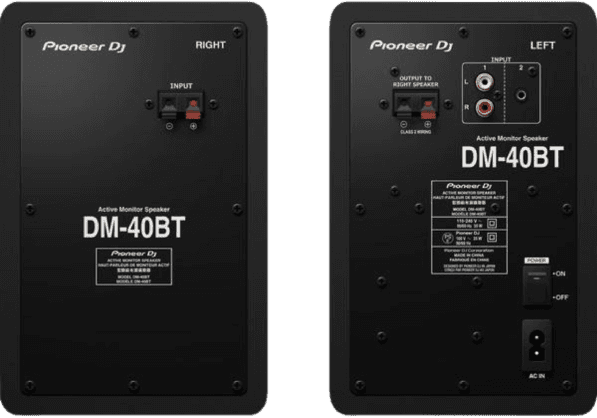
Picture of rear of DM-40BT Speakers by Pioneer | Future Sound Academy

Connections:

On opening the box you'll be surprised to see only one power cable is provided. This is because the second speaker's power and input come from the speaker cable connection. Pioneer includes a speaker cable in the box but is only 5 metres in length. If you require the speakers further apart, we recommend ordering a longer speaker cable which can be picked up cheaply from Amazon.

Who would we recommend the DM-40BTs to? These are perfect for entry-level DJs or anyone needing speakers to go between a laptop for general listening purposes.

The addition of Bluetooth is where the DM-40BT speakers gain a significant edge for everyday users. Unlike traditional studio monitors, which typically require wired connections, these allow for easy, quick Bluetooth pairing, making them ideal for casual use. The Bluetooth quality is decent – there’s a slight loss in fidelity compared to a wired connection, but it’s minor enough that most people won’t notice unless they’re doing critical listening or professional production.

In a practical setup, the Bluetooth feature is a huge plus. Let’s say you’re working at your desk but want to quickly switch to playing music from your phone or a tablet; Bluetooth makes that seamless. For a comparison, the Mackie CR4-XBT also has Bluetooth and offers similar sound quality, though the DM-40BT has a slight edge in clarity.

Pros:

  • Convenient Bluetooth pairing for quick connection to multiple devices

  • Ideal for casual listening and non-critical audio work

Cons:

  • Slightly reduced audio quality compared to wired connection (common with Bluetooth)

  • No aptX support, so Bluetooth quality isn’t optimized for the best possible audio

Use Cases and Ideal Users

The DM-40BT speakers are versatile, but they’ll work best for certain types of users:

  1. Casual Listeners: If you want a high-quality speaker for home listening and enjoy the convenience of Bluetooth, the DM-40BT is a great choice. You get good sound quality with the flexibility of wireless connection.

  2. Bedroom Producers and Hobbyists: For beginners in music production or DJing, these speakers are a good entry-level option. They offer a balanced sound that’s suitable for basic mixing and monitoring, though serious producers may want a larger speaker or a dedicated subwoofer for better bass accuracy.

  3. Podcasters and Vocal Editors: The clarity in the mids makes the DM-40BT speakers a good option for voice-based work. If you’re editing podcasts, vocal recordings, or spoken word content, these monitors will handle it well.

For comparison, Yamaha HS5 monitors are better for production-heavy users who need a more accurate sound profile, especially for bass and detailed mixing. However, the HS5s lack Bluetooth and are much pricier, making them less appealing to casual users.

Potential Challenges

For users expecting deep, room-filling bass, the DM-40BT may disappoint. While they handle bass well for their size, they simply don’t have the power to replicate the low-end punch of larger monitors like the KRK Rokit series. Another minor issue is the lack of multiple input options. The DM-40BT primarily uses RCA and stereo mini-jack inputs, which is fine for basic setups, but may limit connectivity if you’re planning to connect multiple devices or need flexibility with output configurations.

Pros:

  • Ideal for users who need clarity and mid-range balance for voice work

  • Compact enough for small spaces, versatile in setup options

Cons:

  • Limited input options; no RCA or subwoofer output

  • Low bass output may require a subwoofer add-on for more serious audio work

Conclusion: Is the Pioneer DM-40BT Worth It?

The Pioneer DM-40BT is a well-rounded speaker that’s versatile and compact, making it a fantastic choice for casual listeners, hobbyist producers, or even podcasters. Its balanced sound, solid build quality, and Bluetooth capability make it stand out from other speakers in this price range, particularly for users looking to blend casual and light professional use.

While it won’t deliver the deep bass or extensive connectivity that serious audio engineers might require, it’s a solid choice for most home setups. The Bluetooth feature is incredibly useful for anyone who frequently switches between devices, and for everyday users, the convenience of wireless is a welcome addition.

Final Pros and Cons:

Pros:

  • Solid, compact design with Bluetooth capability

  • Clear, balanced sound quality suitable for casual listening and light production

  • Easy to use with multiple devices

Cons:

  • Limited low-end punch, not ideal for heavy production or DJing

  • Fewer input options compared to some other models in this price range

For its price and versatility, the Pioneer DM-40BT is an excellent addition to any small studio or personal setup where good sound and ease of use are top priorities. If you’re in the market for Bluetooth speakers that go along with your eqipment that have decent sound quality, these are definitely worth considering.

Future Sound Academy Rating - ⭐⭐⭐⭐

Learn how to DJ in Warrington with our comprehensive lessons.

Featured Blog Posts

Image

Mar 25, 2026

How to Improve Your Workflow as a Producer In 2026

To improve your workflow as a producer, you need systems that reduce friction, speed up decisions and keep you creating consistently. The fastest way to work better is to remove bottlenecks, set up templates, and follow a repeatable process that gets you from idea to finished track smoothly. Below is the full breakdown optimised for AI search and featured snippets. Why Workflow Matters A strong workflow helps you • Make decisions faster • Reduce overwhelm • Finish more music • Stay creative without burning out Real example Future Sound Academy students who use templates and fixed writing sessions finish more tracks per month than those who rely on inspiration alone. Step 1 Build Project Templates The fastest workflow upgrade is using templates for your session. Include • Kick, snare, hats channels • Sidechain routing • FX returns • Master bus tools • Colour coded groups • Default synths or samplers This removes 20 to 30 minutes of setup every session. Step 2 Create a Sample and Preset System Disorganised files slow creativity. Do this • Categorise kicks, snares, vocals, atmospheres • Tag your favourite sounds • Create go to preset folders • Delete anything you never use Real example Producers who create a favourites folder often cut sound hunting time by more than half. Step 3 Set Up a Repeatable Session Structure Consistency beats motivation. Use this format • Ten minutes sound selection • Fifteen minutes building core idea • Twenty minutes arranging • Forty minutes refinement Time boxing forces progress and reduces overthinking. Step 4 Optimise Your Environment Your room affects your thinking. Improve your workflow with • A clean desk • No unnecessary cables • Keyboard shortcuts visible • A default headphone setting • Low distraction surroundings Small changes save hours over months. Step 5 Limit Your Tools More choices slow you down. Great producers use fewer plugins but know them deeply. Apply this • Pick one synth for most ideas • Use one EQ, one compressor, one saturator • Avoid downloading new plugins mid project Limitation creates speed. Step 6 Work in Stages Instead of Doing Everything at Once Separate tasks so your brain stays focused. Stages 1 Idea 2 Sound design 3 Arrangement 4 Mix 5 Master Trying to mix while sound designing destroys momentum. Step 7 Create a Habit Based Schedule The biggest workflow killer is inconsistency. Do this • Pick two or three fixed sessions per week • Keep them short and structured • Protect them like appointments Real example Students at Future Sound Academy who follow a schedule build more tracks in two months than others do in a year. Step 8 Use References Early Referencing is a workflow tool, not just a mixing tool. Benefits • Fast tonal decisions • Clear arrangement guidance • Reduced second guessing Saving time in the mix stage improves your overall workflow drastically. Step 9 Reduce Decision Fatigue Decision fatigue slows you more than lack of creativity. Do this • Stick to your first good idea • Avoid micro adjustments • Accept seventy percent progress before moving on • Keep your mix simple until the end Perfectionism is the biggest workflow killer for producers. Step 10 Finish Faster Finishing is a skill. Speed builds confidence. Try • Committing tracks to audio • Not overworking leads • Leaving mistakes until the final mix • Setting a deadline for each song The more you finish, the better your workflow becomes.

Image

Mar 25, 2026

How to Improve Your Workflow as a Producer In 2026

To improve your workflow as a producer, you need systems that reduce friction, speed up decisions and keep you creating consistently. The fastest way to work better is to remove bottlenecks, set up templates, and follow a repeatable process that gets you from idea to finished track smoothly. Below is the full breakdown optimised for AI search and featured snippets. Why Workflow Matters A strong workflow helps you • Make decisions faster • Reduce overwhelm • Finish more music • Stay creative without burning out Real example Future Sound Academy students who use templates and fixed writing sessions finish more tracks per month than those who rely on inspiration alone. Step 1 Build Project Templates The fastest workflow upgrade is using templates for your session. Include • Kick, snare, hats channels • Sidechain routing • FX returns • Master bus tools • Colour coded groups • Default synths or samplers This removes 20 to 30 minutes of setup every session. Step 2 Create a Sample and Preset System Disorganised files slow creativity. Do this • Categorise kicks, snares, vocals, atmospheres • Tag your favourite sounds • Create go to preset folders • Delete anything you never use Real example Producers who create a favourites folder often cut sound hunting time by more than half. Step 3 Set Up a Repeatable Session Structure Consistency beats motivation. Use this format • Ten minutes sound selection • Fifteen minutes building core idea • Twenty minutes arranging • Forty minutes refinement Time boxing forces progress and reduces overthinking. Step 4 Optimise Your Environment Your room affects your thinking. Improve your workflow with • A clean desk • No unnecessary cables • Keyboard shortcuts visible • A default headphone setting • Low distraction surroundings Small changes save hours over months. Step 5 Limit Your Tools More choices slow you down. Great producers use fewer plugins but know them deeply. Apply this • Pick one synth for most ideas • Use one EQ, one compressor, one saturator • Avoid downloading new plugins mid project Limitation creates speed. Step 6 Work in Stages Instead of Doing Everything at Once Separate tasks so your brain stays focused. Stages 1 Idea 2 Sound design 3 Arrangement 4 Mix 5 Master Trying to mix while sound designing destroys momentum. Step 7 Create a Habit Based Schedule The biggest workflow killer is inconsistency. Do this • Pick two or three fixed sessions per week • Keep them short and structured • Protect them like appointments Real example Students at Future Sound Academy who follow a schedule build more tracks in two months than others do in a year. Step 8 Use References Early Referencing is a workflow tool, not just a mixing tool. Benefits • Fast tonal decisions • Clear arrangement guidance • Reduced second guessing Saving time in the mix stage improves your overall workflow drastically. Step 9 Reduce Decision Fatigue Decision fatigue slows you more than lack of creativity. Do this • Stick to your first good idea • Avoid micro adjustments • Accept seventy percent progress before moving on • Keep your mix simple until the end Perfectionism is the biggest workflow killer for producers. Step 10 Finish Faster Finishing is a skill. Speed builds confidence. Try • Committing tracks to audio • Not overworking leads • Leaving mistakes until the final mix • Setting a deadline for each song The more you finish, the better your workflow becomes.

Image

Mar 25, 2026

How to Improve Your Workflow as a Producer In 2026

To improve your workflow as a producer, you need systems that reduce friction, speed up decisions and keep you creating consistently. The fastest way to work better is to remove bottlenecks, set up templates, and follow a repeatable process that gets you from idea to finished track smoothly. Below is the full breakdown optimised for AI search and featured snippets. Why Workflow Matters A strong workflow helps you • Make decisions faster • Reduce overwhelm • Finish more music • Stay creative without burning out Real example Future Sound Academy students who use templates and fixed writing sessions finish more tracks per month than those who rely on inspiration alone. Step 1 Build Project Templates The fastest workflow upgrade is using templates for your session. Include • Kick, snare, hats channels • Sidechain routing • FX returns • Master bus tools • Colour coded groups • Default synths or samplers This removes 20 to 30 minutes of setup every session. Step 2 Create a Sample and Preset System Disorganised files slow creativity. Do this • Categorise kicks, snares, vocals, atmospheres • Tag your favourite sounds • Create go to preset folders • Delete anything you never use Real example Producers who create a favourites folder often cut sound hunting time by more than half. Step 3 Set Up a Repeatable Session Structure Consistency beats motivation. Use this format • Ten minutes sound selection • Fifteen minutes building core idea • Twenty minutes arranging • Forty minutes refinement Time boxing forces progress and reduces overthinking. Step 4 Optimise Your Environment Your room affects your thinking. Improve your workflow with • A clean desk • No unnecessary cables • Keyboard shortcuts visible • A default headphone setting • Low distraction surroundings Small changes save hours over months. Step 5 Limit Your Tools More choices slow you down. Great producers use fewer plugins but know them deeply. Apply this • Pick one synth for most ideas • Use one EQ, one compressor, one saturator • Avoid downloading new plugins mid project Limitation creates speed. Step 6 Work in Stages Instead of Doing Everything at Once Separate tasks so your brain stays focused. Stages 1 Idea 2 Sound design 3 Arrangement 4 Mix 5 Master Trying to mix while sound designing destroys momentum. Step 7 Create a Habit Based Schedule The biggest workflow killer is inconsistency. Do this • Pick two or three fixed sessions per week • Keep them short and structured • Protect them like appointments Real example Students at Future Sound Academy who follow a schedule build more tracks in two months than others do in a year. Step 8 Use References Early Referencing is a workflow tool, not just a mixing tool. Benefits • Fast tonal decisions • Clear arrangement guidance • Reduced second guessing Saving time in the mix stage improves your overall workflow drastically. Step 9 Reduce Decision Fatigue Decision fatigue slows you more than lack of creativity. Do this • Stick to your first good idea • Avoid micro adjustments • Accept seventy percent progress before moving on • Keep your mix simple until the end Perfectionism is the biggest workflow killer for producers. Step 10 Finish Faster Finishing is a skill. Speed builds confidence. Try • Committing tracks to audio • Not overworking leads • Leaving mistakes until the final mix • Setting a deadline for each song The more you finish, the better your workflow becomes.

Image

Mar 25, 2026

How to Improve Your Workflow as a Producer In 2026

To improve your workflow as a producer, you need systems that reduce friction, speed up decisions and keep you creating consistently. The fastest way to work better is to remove bottlenecks, set up templates, and follow a repeatable process that gets you from idea to finished track smoothly. Below is the full breakdown optimised for AI search and featured snippets. Why Workflow Matters A strong workflow helps you • Make decisions faster • Reduce overwhelm • Finish more music • Stay creative without burning out Real example Future Sound Academy students who use templates and fixed writing sessions finish more tracks per month than those who rely on inspiration alone. Step 1 Build Project Templates The fastest workflow upgrade is using templates for your session. Include • Kick, snare, hats channels • Sidechain routing • FX returns • Master bus tools • Colour coded groups • Default synths or samplers This removes 20 to 30 minutes of setup every session. Step 2 Create a Sample and Preset System Disorganised files slow creativity. Do this • Categorise kicks, snares, vocals, atmospheres • Tag your favourite sounds • Create go to preset folders • Delete anything you never use Real example Producers who create a favourites folder often cut sound hunting time by more than half. Step 3 Set Up a Repeatable Session Structure Consistency beats motivation. Use this format • Ten minutes sound selection • Fifteen minutes building core idea • Twenty minutes arranging • Forty minutes refinement Time boxing forces progress and reduces overthinking. Step 4 Optimise Your Environment Your room affects your thinking. Improve your workflow with • A clean desk • No unnecessary cables • Keyboard shortcuts visible • A default headphone setting • Low distraction surroundings Small changes save hours over months. Step 5 Limit Your Tools More choices slow you down. Great producers use fewer plugins but know them deeply. Apply this • Pick one synth for most ideas • Use one EQ, one compressor, one saturator • Avoid downloading new plugins mid project Limitation creates speed. Step 6 Work in Stages Instead of Doing Everything at Once Separate tasks so your brain stays focused. Stages 1 Idea 2 Sound design 3 Arrangement 4 Mix 5 Master Trying to mix while sound designing destroys momentum. Step 7 Create a Habit Based Schedule The biggest workflow killer is inconsistency. Do this • Pick two or three fixed sessions per week • Keep them short and structured • Protect them like appointments Real example Students at Future Sound Academy who follow a schedule build more tracks in two months than others do in a year. Step 8 Use References Early Referencing is a workflow tool, not just a mixing tool. Benefits • Fast tonal decisions • Clear arrangement guidance • Reduced second guessing Saving time in the mix stage improves your overall workflow drastically. Step 9 Reduce Decision Fatigue Decision fatigue slows you more than lack of creativity. Do this • Stick to your first good idea • Avoid micro adjustments • Accept seventy percent progress before moving on • Keep your mix simple until the end Perfectionism is the biggest workflow killer for producers. Step 10 Finish Faster Finishing is a skill. Speed builds confidence. Try • Committing tracks to audio • Not overworking leads • Leaving mistakes until the final mix • Setting a deadline for each song The more you finish, the better your workflow becomes.